A design constitution: leaving AI nothing to guess
The way to get output that looks the same every time from AI is to write the visual rules so clearly that nothing is left to guessing. What a design constitution is, what goes in it, and how to write one.
If you want the same worksheet from AI to look the same every week, you need to write the visual rules once, clearly enough that nothing is left to guessing. I call this document a design constitution.
Why a “constitution”?
Most people who start producing materials with AI define the content first: topic, level, number of questions, instructions. That’s a good start, but it isn’t enough. The same content arrives one week in a serif font and the next in a sans-serif; one week with wide margins and the next with cramped ones. Style matters as much as content. When a student sees a page with the same layout every week, they don’t have to search for where to look or what to do.
The document that collects these rules could also be called a “style guide”. But a guide points the way; following it is recommended. A constitution is binding: It’s precise and sharp, not open to interpretation, and applied to the letter. That’s exactly what a set of visual rules given to an AI needs to be.
Leave no room for guessing
AI has a strong tendency to fill gaps with guesses wherever it lacks information. If no font is specified, it picks one; if no spacing is specified, it invents some. Each guess may look reasonable, but a different guess is made every time. That’s where inconsistency comes from.
So the language of a constitution rests on a single principle: Everything that can be precise is written precisely and in detail. Numbers instead of adjectives, values instead of descriptions.
| Vague rule | Precise rule |
|---|---|
| Make the headings stand out. | Heading: Inter Bold, 20 pt, line height 1.2. |
| Keep the margins balanced. | Margins: top 18 mm, bottom 20 mm, left and right 18 mm. |
| Leave enough space between exercises. | Between exercises: 8 mm. Between exercise title and instructions: 2 mm. |
| Keep the tables simple. | Table: horizontal rules only, 0.5 pt, 40% gray; header row Inter Bold 10 pt; cell padding 2 mm. |
| Put the logo in the corner. | Logo: top right corner, 10 mm high, inside the margin; first page only. |
Every rule on the left leaves the AI something to guess. The ones on the right don’t. That’s also the key to getting the same result every time.
What should a constitution contain?
A design constitution has five essential sections:
- Fonts: Which font, which weight, which size, which line height; separately for headings, body, instructions and footnotes. Where the font files are, and what to do if a font can’t be found.
- Spacing rules: Margins, distances between sections and exercises, the length and spacing of answer lines.
- Grid: How many columns the page is divided into, the gutter between columns, how many columns each element spans.
- Logo use: Its position, size, which pages it appears on, which color to use, and how not to use it.
- Table styles: Rules, header row, cell padding, alignment.
A constitution doesn’t need to list its prohibitions one by one. A single prohibition covers them all:
Don’t guess. Don’t step outside the constitution. When something has no rule in the constitution, ask.
Every rule written in the constitution is followed to the letter. In a situation that isn’t written down, the AI doesn’t decide; it asks. And the question it asks points to a rule that should be added to the constitution.
Example: a weekly worksheet constitution
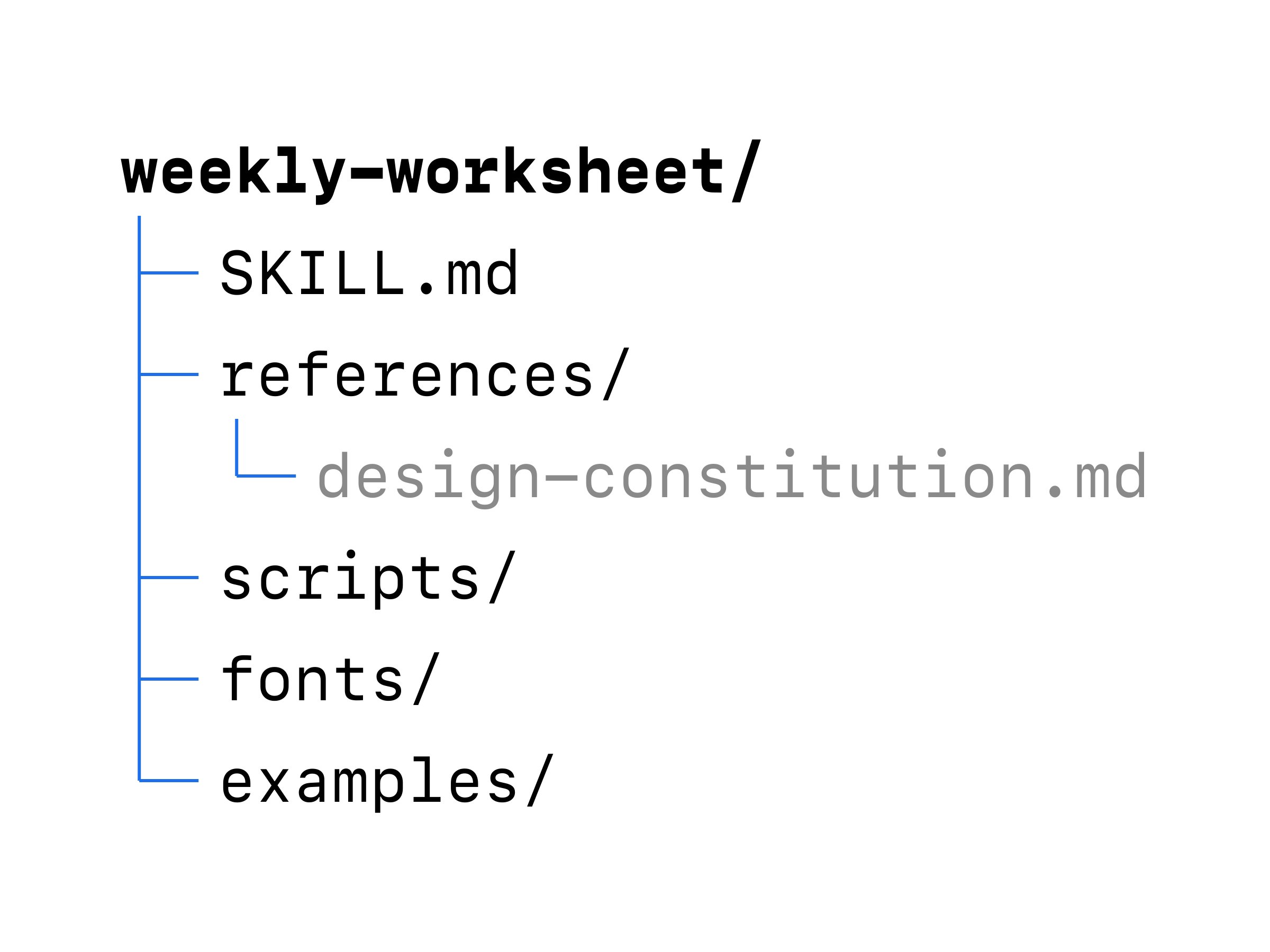
The excerpt below comes from the constitution of the imaginary weekly-worksheet skill from the skills post. The skill produces an A4 worksheet (PDF) every week for private students. The constitution lives in the references/design-constitution.md file.
# Design constitution: weekly-worksheet

Follow every rule in this document to the letter. When something
has no rule here, don't guess; ask the teacher.

## 1. Page
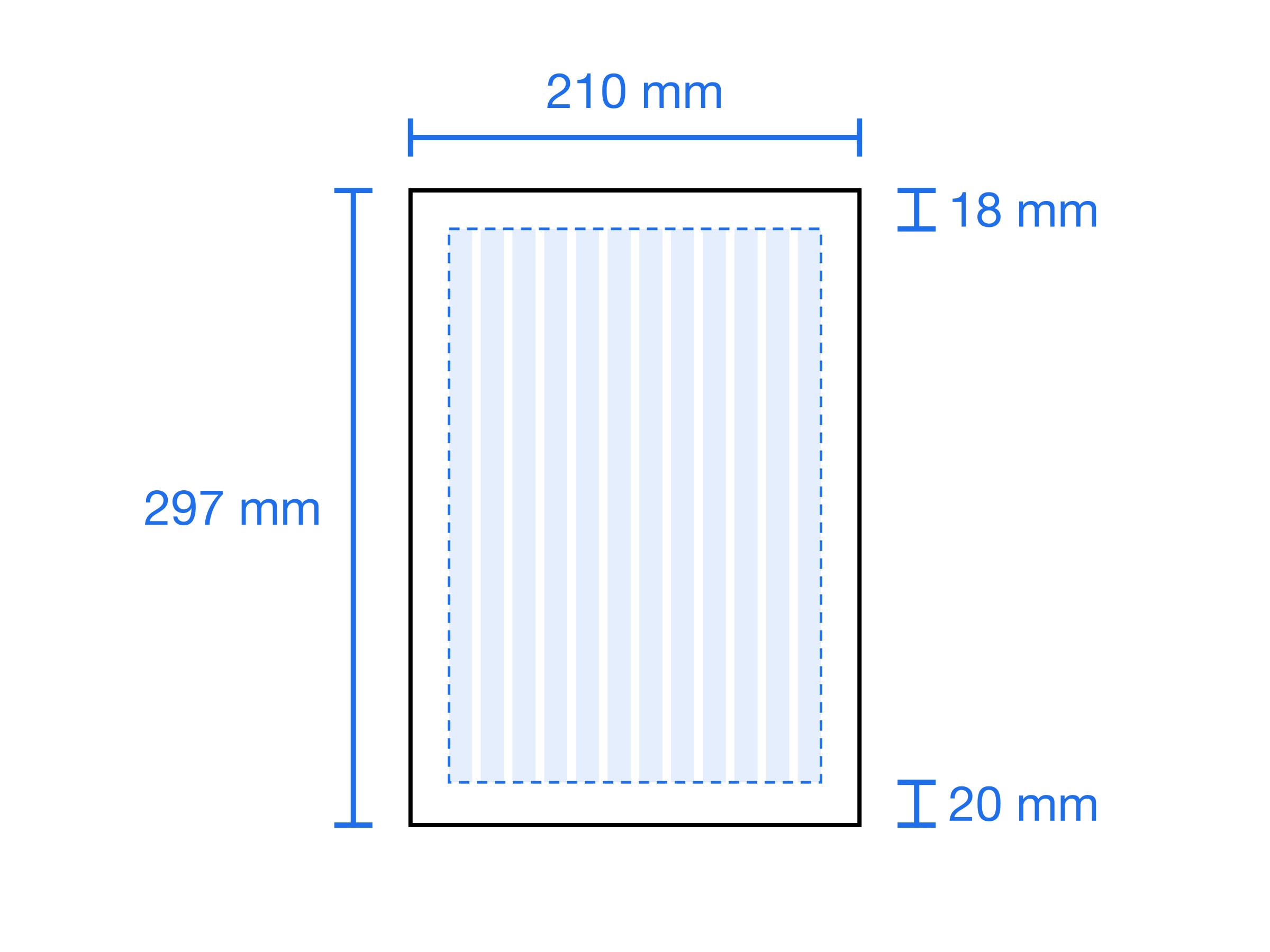
- Size: A4 portrait (210 × 297 mm).
- Margins: top 18 mm, bottom 20 mm, left 18 mm, right 18 mm.
- Background: white. No colored backgrounds.
- Page number: bottom center, Inter Regular 8 pt, 60% gray.
  Not shown on the first page.

## 2. Grid
- 12 columns, 4 mm gutter.
- Headings, instructions and exercises span all 12 columns.
- A word box sits in columns 1–4 only; the exercise that uses it
  sits in columns 5–12.
- No element runs into the margin.

## 3. Fonts
| Element           | Font          | Size  | Line height |
|-------------------|---------------|-------|-------------|
| Page title        | Inter Bold    | 20 pt | 1.2         |
| Exercise title    | Inter Bold    | 12 pt | 1.3         |
| Instructions      | Inter Italic  | 10 pt | 1.4         |
| Body and questions| Source Serif  | 11 pt | 1.5         |
| Footnote          | Inter Regular | 8 pt  | 1.4         |

- Font files are in the fonts/ folder. No other fonts are used.
- If a font fails to load, no PDF is produced; the teacher is told.
- Emphasis uses bold only. No underline, no colored text.

## 4. Spacing
- After the page title: 10 mm.
- Between exercises: 8 mm.
- Between exercise title and instructions: 2 mm.
- Between instructions and first question: 4 mm.
- Between questions: 3 mm.
- Gap-fill line: at least 30 mm, 0.5 pt, 40% gray.
- Answer lines: 9 mm apart, 0.5 pt, 40% gray.

## 5. Logo
- Position: first page, top right corner, inside the margin.
- Height: 10 mm. Width follows the aspect ratio.
- File: assets/logo-black.svg. No other color is used.
- The logo is not rotated, cropped or written over.
- No logo on the other pages.

## 6. Tables
- Horizontal rules only: 0.5 pt, 40% gray. No vertical rules.
- Header row: Inter Bold 10 pt, with a 1 pt black rule below.
- Cell padding: top and bottom 2 mm, left and right 3 mm.
- Text aligns left, numbers align right.
- A table never breaks across pages; if it doesn't fit, it moves
  to the next page.
None of the rules in the excerpt depend on an adjective like “nice”, “balanced” or “appropriate”. Each one ends with a measurement, a file, or an explicit “not used”. Whether a rule was applied can be checked one by one, just by looking at the PDF.
How to write a constitution
A constitution isn’t written by putting rules on a blank page; it’s written by working backwards from a good output. The process has three stages:
- Reach the result you want. Work with the AI on a worksheet until it looks exactly the way you want. Font, spacing, grid, logo, table: fix each one in turn. Don’t try to write rules at this stage; focus only on the result.
- Stress-test the result. Once you have a perfect output, don’t stop; try possible scenarios. What happens if the number of exercises doubles? If a table lands at the end of a page? If an instruction runs to three lines? If a font can’t be found? Anything that breaks in a scenario points to a rule that hasn’t been written yet. Keep going until you get a flawless result.
- Have the AI write the result up as a constitution. You don’t have to write the rules yourself. In the same chat, ask the AI to turn the result you reached, and the decisions made during testing, into a constitution that leaves nothing to guessing. Then read the text and replace every vague expression with a measurement.
The strength of this method is this: Every rule in the constitution is a record of a decision that was tried on a real output and worked. No rule was written from guesswork at a desk.
Where the constitution sits in a skill
A constitution can be used on its own; you can give it to the AI at the start of every chat. But it’s at its strongest inside a skill (see Skills: giving AI a recipe for the job).
In the weekly-worksheet skill, the constitution lives in references/design-constitution.md. A single sentence in SKILL.md connecting to it is enough:
Before generating the PDF, read references/design-constitution.md.
Every decision about the look follows this file. When something
has no rule in the file, don't guess; ask the teacher.
The constitution works together with the other parts of the skill:
- Fonts and the logo live in the skill folder; the constitution gives their paths. The AI never has to look for a font or a logo.
- The reference output is the constitution applied. The constitution states the rule; the reference output shows what the result looks like. The two should never contradict each other; when the constitution changes, the reference output is refreshed.
- The check script audits the measurements in the constitution: an element running into the margin, a broken table, or a font that didn’t load is caught before the worksheet reaches the teacher.
This way, the worksheet is produced every week with the same rules and the same materials, and goes through the same check. And the result looks the same every week.